For the complete documentation index, see llms.txt
Node endpoints
You can run your own node for interacting with the Midnight Network or connect to public endpoints provided by infrastructure service providers.
This guide provides instructions on how to use the public network endpoints for the Midnight blockchain.
Quickstart
Run your first request against the Preview network:
- cURL
- TypeScript
- Python
- Rust
curl -X POST https://rpc.preview.midnight.network/ \
  -H "Content-Type: application/json" \
  -d '{"jsonrpc":"2.0","method":"system_chain","params":[],"id":1}'
const res = await fetch("https://rpc.preview.midnight.network/", {
  method: "POST",
  headers: { "Content-Type": "application/json" },
  body: JSON.stringify({
    jsonrpc: "2.0",
    method: "system_chain",
    params: [],
    id: 1
  })
});

console.log(await res.json());
import requests

response = requests.post(
    "https://rpc.preview.midnight.network/",
    json={
        "jsonrpc": "2.0",
        "method": "system_chain",
        "params": [],
        "id": 1
    }
)

print(response.json())
use reqwest::Client;
use serde_json::json;

#[tokio::main]
async fn main() {
    let client = Client::new();

    let res = client.post("https://rpc.preview.midnight.network/")
        .json(&json!({
            "jsonrpc": "2.0",
            "method": "system_chain",
            "params": [],
            "id": 1
        }))
        .send()
        .await
        .unwrap();

    let body = res.text().await.unwrap();
    println!("{}", body);
}
Public network endpoints
Midnight maintains public endpoints for the Preview test network. Blockfrost provides public Preprod and Mainnet RPC, which needs a Blockfrost project token for that network. The Midnight-hosted rpc.mainnet.midnight.network and rpc.preprod.midnight.network endpoints are retired. For the full per-network reference, including indexer, faucet, and proof server endpoints, see Networks and environments.
- Preview
- Preprod
- Mainnet
The primary development environment maintained by core engineering.
| Service | URL |
|---|---|
| RPC endpoint | https://rpc.preview.midnight.network/ |
| WebSocket | wss://rpc.preview.midnight.network/ |
| Explorer | https://polkadot.js.org/apps/?rpc=wss%3A%2F%2Frpc.preview.midnight.network#/explorer |
Pre-production environment for final testing before Mainnet deployment. Blockfrost serves Preprod RPC: append ?project_id=<token> from a Midnight Preprod project on blockfrost.io to each URL. The Midnight-hosted rpc.preprod.midnight.network endpoint was retired at 22:00 UTC on 9 October 2026. It can still answer requests, but it can stop at any time, so don't use it. See Blockfrost: the Preprod and Mainnet indexer and RPC provider.
| Service | URL |
|---|---|
| RPC endpoint | https://rpc.midnight-preprod.blockfrost.io?project_id=<token> |
| WebSocket | wss://rpc.midnight-preprod.blockfrost.io?project_id=<token> |
| Explorer | In Polkadot.js Apps, add a custom endpoint with the WebSocket URL above, including your token. Polkadot.js Apps is a third-party web app: it keeps that URL, token included, in its page address and in your browser's storage, so use a token you are prepared to treat as public. |
The production network. Mainnet RPC is served by Blockfrost: append ?project_id=<token> from a Midnight Mainnet project on blockfrost.io to each URL. The Midnight-hosted rpc.mainnet.midnight.network endpoint was retired at 22:00 UTC on 30 September 2026. It can still answer requests, but it can stop at any time, so don't use it. See Blockfrost: the Preprod and Mainnet indexer and RPC provider.
| Service | URL |
|---|---|
| RPC endpoint | https://rpc.midnight-mainnet.blockfrost.io?project_id=<token> |
| WebSocket | wss://rpc.midnight-mainnet.blockfrost.io?project_id=<token> |
| Explorer | In Polkadot.js Apps, add a custom endpoint with the WebSocket URL above, including your token. Polkadot.js Apps is a third-party web app: it keeps that URL, token included, in its page address and in your browser's storage, so use a token you are prepared to treat as public. |
Midnight provides the Preview public endpoints for development and testing. Blockfrost provides the public Preprod and Mainnet RPC, and usage limits depend on your Blockfrost plan. For production DApps, size your Blockfrost plan for your traffic or run your own RPC node.
Common RPC queries
The following examples show how to query the chain information, list available RPC methods, and get the latest block for the Preview network.
Query chain information
Example query to get the chain name for the Preview network:
curl -X POST \
  -H "Content-Type: application/json" \
  -d '{
        "jsonrpc": "2.0",
        "method": "system_chain",
        "params": [],
        "id": 1
      }' \
  https://rpc.preview.midnight.network/
List available RPC methods
Query all available RPC methods and save to a file for the Preview network:
curl -X POST \
  -H "Content-Type: application/json" \
  -d '{
        "jsonrpc": "2.0",
        "method": "rpc_methods",
        "params": [],
        "id": 1
      }' \
  https://rpc.preview.midnight.network/ \
  | jq '.' > rpc_methods.json
Get latest block
Example query to get the latest block for the Preview network:
curl -X POST \
  -H "Content-Type: application/json" \
  -d '{
        "jsonrpc": "2.0",
        "method": "chain_getBlock",
        "params": [],
        "id": 1
      }' \
  https://rpc.preview.midnight.network/
Insomnia API collection
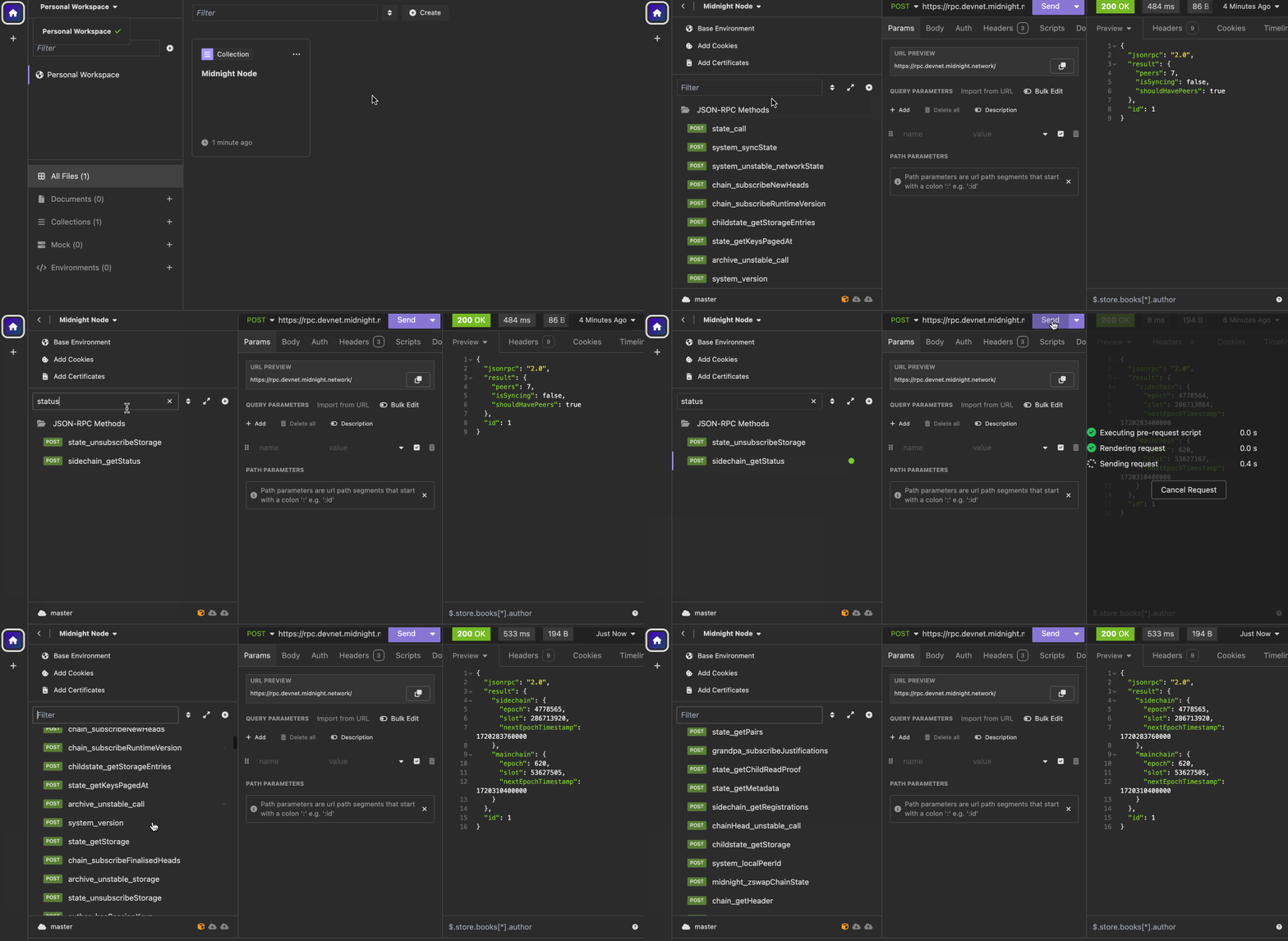
The Insomnia collection provides pre-configured requests for interacting with Midnight RPC endpoints.
Download
Download the collection file: Midnight Node Insomnia collection
Import the collection
Open Insomnia and select Import.
Choose the File tab and select the downloaded file.
Click Scan to import the collection.
Download Insomnia from the official website if you haven't already.
Use the collection
Locate the Midnight Node collection in your workspace.
Select the environment for your network. Midnight Preview needs no changes. Midnight Preprod points at the Blockfrost RPC URL with a YOUR_PREPROD_PROJECT_ID placeholder. Open the environment and replace the placeholder with the project ID of a Midnight Preprod project on Blockfrost before you send a request.
Run requests to explore available methods.
Troubleshoot
These are some of the common issues that you might encounter and how to fix them.
Request fails with 405
Ensure you are using POST, not GET.
Invalid JSON response
Check JSON formatting and the Content-Type header. The request body should be a valid JSON object.
Empty result
Some RPC methods require parameters. To see the full list of available methods and required parameters, see the Node OpenRPC specification.
Next steps
- Explore the Node OpenRPC specification for full method documentation
- Inspect blocks and read ledger parameters from these endpoints with the node toolkit